

How to view your customer list
With Menubly, you own your customer data. Every time someone places an order through your menu, their contact information is saved to your Customers list. Unlike third-party delivery apps that keep this data from you, Menubly lets you access and use it to grow your business.
Access your customer list
Log into your Menubly account
Click on "Customers" in the top navigation menu
If you have multiple menus, use the dropdown next to "Customers" to select which menu's customers you want to view
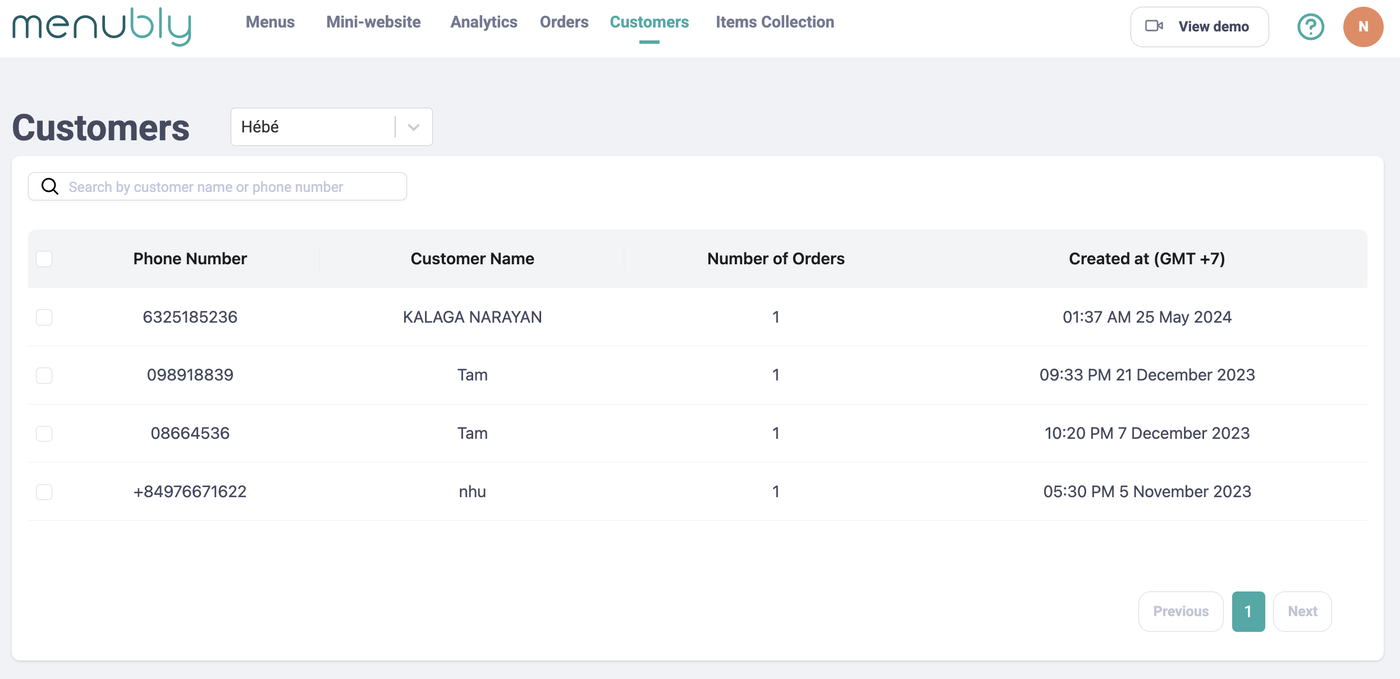
Understanding the customers table
Your customers are displayed in a table with the following columns:
Column | Description |
|---|---|
Phone Number | Customer's contact number |
Customer Name | Name provided when ordering |
Number of Orders | Total orders placed by this customer |
Created at | Date and time of their first order |
Search for customers
Use the search bar at the top to quickly find customers by:
Customer name
Phone number
Why owning your customer data matters
When customers order through delivery apps like Uber Eats or DoorDash, the app keeps the customer information. You never get their phone number or email, so you can't reach out to them directly.
With Menubly, every customer's contact info is yours. You can:
Send promotions - Text or WhatsApp your customers about special offers
Announce new menu items - Let regulars know when you add new dishes
Share updates - Notify customers about holiday hours or temporary closures
Reward loyal customers - Reach out to frequent orderers with exclusive deals
Request reviews - Ask happy customers to leave a review on Google