

How can I collect payment from my customers?
Menubly gives you two ways to collect payment from your customers: Manual Payment Collection (cash on delivery, bank transfer, etc.) and Online Payment Collection with Stripe (credit card, Apple Pay, Google Pay, and more). This guide explains how each method works so you can choose the best fit for your restaurant.
Quick comparison
Manual Payment Collection | Online Payment with Stripe | |
|---|---|---|
When customer pays | After the order is placed | Instantly at checkout |
Payment methods | Cash on delivery, bank transfer, QR code, etc. | Credit/debit card, Apple Pay, Google Pay, Cash App Pay, and 100+ methods |
Setup required | Add your payment instructions in Menubly | Connect a Stripe account to Menubly |
Best for | Restaurants that want to review orders before collecting payment | Restaurants that want instant, hands-off payment processing |
Option 1: Manual Payment Collection
Manual payment collection lets your customers place orders without paying upfront. You review the order first, then send them an invoice with your payment instructions (e.g., bank transfer details, Venmo, or cash on delivery).
How it works
A customer places an order through your Menubly menu
The order appears in your Orders dashboard with a payment status of Unpaid
You review the order and contact the customer if needed
Click Send Invoice to generate an invoice with your pre-configured payment instructions
Send the invoice link to your customer via WhatsApp, SMS, or email
The customer completes payment using the method on the invoice
How to set it up
Log into your Menubly account
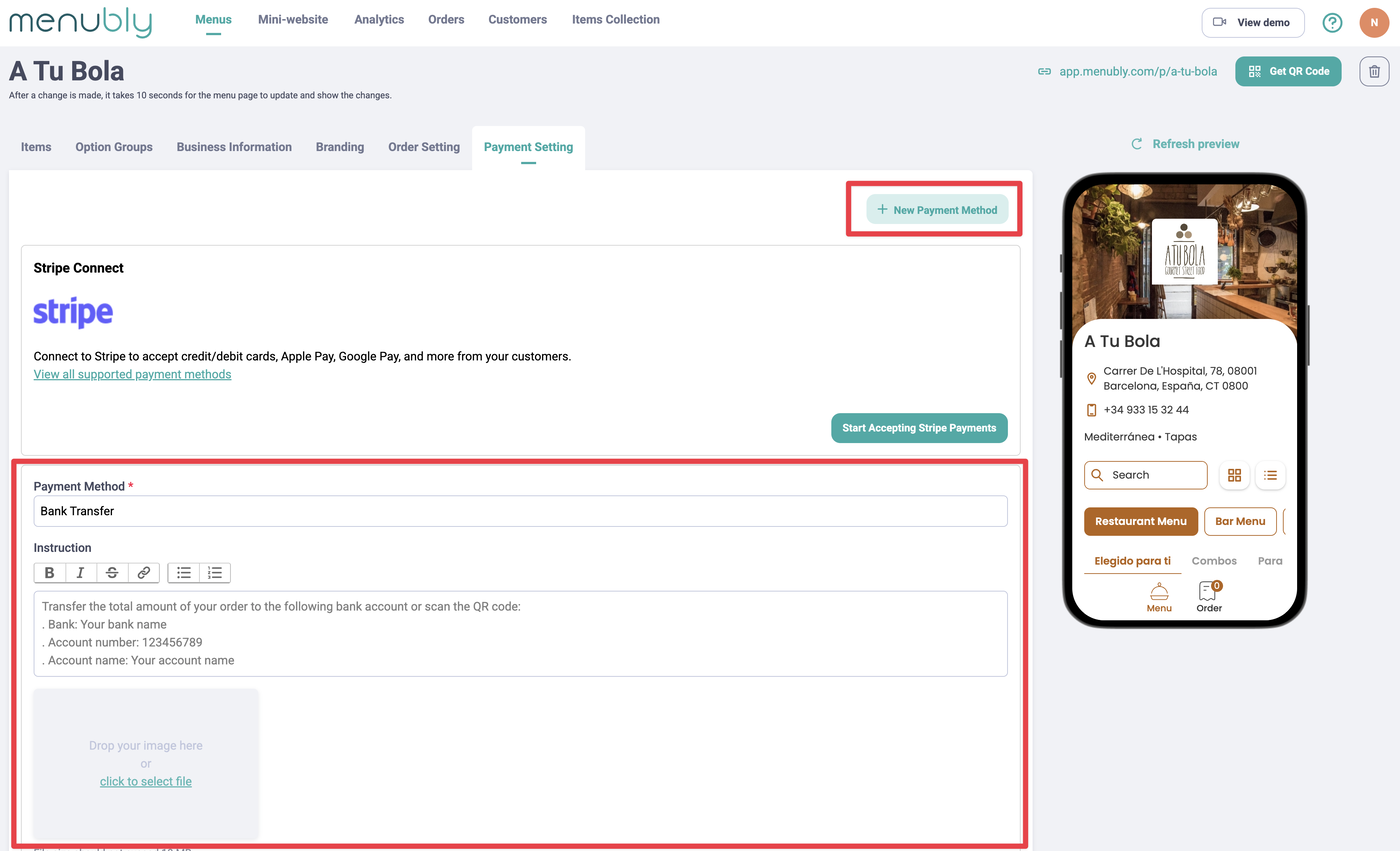
Go to the Payment Setting tab
Click + New Payment Method
Add your payment method information:
Payment method — e.g., Cash on delivery, Bank transfer
Instruction — e.g., "Please transfer to bank account XXXXXXX"
Image — upload a QR code or other payment image (optional)
Click Save
To add more methods, click + New Payment Method
Tip: You can add multiple payment methods (e.g., both cash on delivery and bank transfer) to give your customers flexibility.
Advantages
Review every order before collecting payment
No transaction fees from Stripe — you keep 100% of the payment
Works with any payment method your customers prefer
Considerations
Payment isn't instant — there may be a delay between the order and payment
You need to manually send invoices and track payment status
Option 2: Online Payment Collection with Stripe
Stripe is a secure online payment platform that lets your customers pay instantly when they place an order. Menubly connects directly with Stripe — no technical integration required.
How it works
A customer places an order through your Menubly menu
At checkout, they choose their preferred payment method (credit card, Apple Pay, Google Pay, etc.)
Payment is processed immediately
You receive the payment directly in your linked Stripe account
The order appears in your Orders dashboard with a payment status of Paid
How to set it up
Log into your Menubly account
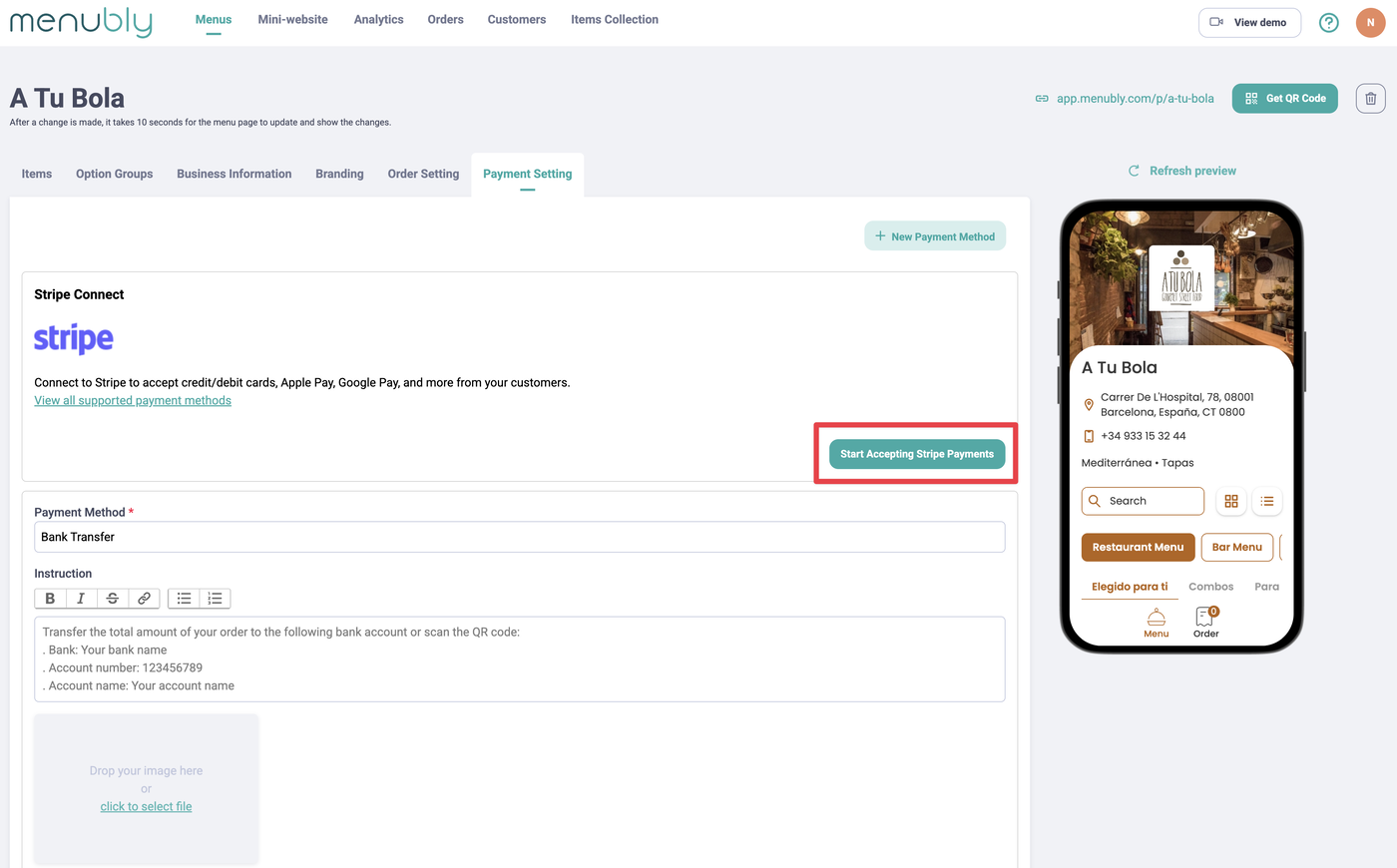
Go to Account > Stripe Connect
Click Connect to Stripe and follow the Stripe onboarding steps
Once connected, enable Stripe payments on your menu
For the full walkthrough, see How to connect Stripe with Menubly.
Advantages
Customers pay instantly — no chasing payments
Supports credit/debit cards, Apple Pay, Google Pay, Cash App Pay, and 100+ methods
Simple setup directly within Menubly
Considerations
Requires a Stripe account (you can create one during setup if you don't have one)
Stripe charges transaction fees — see Stripe's pricing
Which method should I choose?
Choose Manual if you want to review orders before collecting payment, or if your customers prefer cash or bank transfers.
Choose Stripe if you want instant payments with no manual follow-up, and your customers prefer paying by card or digital wallets.
Frequently Asked Questions
Do I need a Stripe account to accept payments?
Only if you want to accept online payments (credit card, Apple Pay, etc.). For manual payment collection (cash, bank transfer), no Stripe account is needed.
Are there any fees for using manual payment collection?
No. Menubly does not charge any fees for manual payment collection. You collect payment directly from your customers using your preferred method.
What fees does Stripe charge?
Stripe's fees vary by country and payment method. Check Stripe's pricing page for current rates. Menubly does not add any additional fees on top of Stripe's charges.
How do I send an invoice for a manual payment order?
Go to your Orders dashboard, find the order, and click Send Invoice. Copy the invoice link and send it to your customer via WhatsApp, SMS, or email. See How to manage orders for details.
What happens if a customer doesn't pay after placing a manual order?
The order will remain with an Unpaid payment status in your dashboard. You can resend the invoice or contact the customer directly using their phone number from the order details.
Can I switch from manual to Stripe (or vice versa) later?
Yes. You can change your payment setup at any time from the Payment Setting and Stripe Connect tabs in your Menubly account.